Monday, 19 October 2015

Caching the WEBApi REST calls using CacheCow - In memory

Caching is a very important aspect when we are designing  a RESTfull web APIs. The main advantage is we do not need to send the same resource over and over again if the content is not updated.

Traditional way of doing the caching is using ETags and maintain these ETags manually in both server and client end. ETag(Entity Tag) is the property which client validates against each request to a resource. Client sends the  request with the If-None-Match: "ETag#". If the ETag not updated , the server returns the 304 - Not Modified . ie : Client has the latest version of the resource requested.

Installing and configuring the Cachecow is simple. All we need to do it install the nuget package to the WebApi project.

Install-Package CacheCow.Server -Version 0.4.12

Add the following code to the WebApiConfig.cs file.
 
var cacheCowCacheHandler = new CacheCow.Server.CachingHandler();
config.MessageHandlers.Add(cacheCowCacheHandler);

This would create an in-memory cache for requested resources (Weak resources which consist the 'W/' prefix in the ETag ). This is Ok for a single server application where there are no any load balances or web farms. I will tell you how to configure persistence caching using CacheCow in my next post.

Thursday, 15 October 2015

WebAPI Data call with Pagination

Most of the time when we are calling for a data API call, we fetch all records and do the pagination in the client side. But this hinders the network performance and lead to a heavy unnecessary data fetch. Hence , it is better to do the pagination in the server side and return only required data to the client.

Following code demonstrates an easy way to achieve this.

1. The WebAPI controller code
 
[HttpGet, Route("ByClient/{clientID:int}")]
public IHttpActionResult GetByClient(int clientID, int pageSize=5, int page=1 ,string sort= "id")
{
      try
      {
          object header;
          var receivedModel = VehicleProvider.GetByClient(clientID, pageSize , page,  sort, out header);

          HttpContext.Current.Response.Headers.Add("Pagination",
              Newtonsoft.Json.JsonConvert.SerializeObject(header));

          IHttpActionResult response = Ok(receivedModel);
          return response;
     }
     catch (Exception)
     {
          return InternalServerError();
     }
           
}

The actual pagination is going inside the BL's GetByClient method. In this code we are adding a response header attribute as "Pagination". This information is useful to client in order to determine the current data location and the total size.
2. The BL Code
 
public IQueryable GetByClient(int clientID, int pageSize, int page, string sort, out object header)
        {
            var totalCount = _vehicleService.Count();
            var totalPages = (int)Math.Ceiling((double)totalCount / pageSize);


            var paginationHeader = new
            {
                currentPage = page,
                pageSize = pageSize,
                totalCount = totalCount,
                totalPages = totalPages
            };

            header = paginationHeader;

            var results = VehicleMap.EntityToModelQueryble( _vehicleService.GetAll(r => r.ClientId == clientID));
            return results.ApplySort(sort).Skip(pageSize*(page - 1))
                .Take(pageSize);
        }

In this code , we are creating a new object to pass as the header.

Wednesday, 14 October 2015

Dynamic Sorting for WebAPI Get method

We can sort results which returns from a WebAPI Get method using Linq Dynamics as follows.

First of all we need to create an extension method for IQueryable<T>. This method would perform required sorting. Following is the code.


public static class IQueryableExtensions
    {
        public static IQueryable<T> ApplySort<T>(this IQueryable<T> source, string sort)
        {
            if (source == null)
            {
                throw new ArgumentNullException("source");
            }

            if (sort == null)
            {
                return source;
            }

           var lstSort = sort.Split(',');

      
            string completeSortExpression = "";
            foreach (var sortOption in lstSort)
            {
           
                if (sortOption.StartsWith("-"))
                {
                    completeSortExpression = completeSortExpression + sortOption.Remove(0, 1) + " descending,";
                }
                else
                {
                    completeSortExpression = completeSortExpression + sortOption + ",";
                }

            }

            if (!string.IsNullOrWhiteSpace(completeSortExpression))
            {
                source = source.OrderBy(completeSortExpression.Remove(completeSortExpression.Count() - 1));
            }

            return source;
        }
    }


We have hard coded the separator and treat the - sign as the descending sorter. source.OrderBy is using the linq dynamics OrderBy method.
Application of the sorting can be done as follows.

 
[HttpGet, Route("ByClient/{clientID:int}")]
public IHttpActionResult GetByClient(int clientID,string sort="id")
{
     try
      {
          var receivedModel = VehicleProvider.GetByClient(clientID);
          IHttpActionResult response = Ok(receivedModel.ApplySort(sort));
          return response;
      }
      catch (Exception)
      {
          return InternalServerError();
      }
     
}


The VehicleProvider.GetByClient method should return an IQueryable<T>. All we need to do is plug the ApplySort method with sort parameters to the result.

[Solved] : HTTP 405 - Method Not Allowed from WebAPI DELETE request

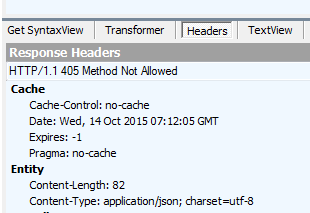
The IIS would return the 405 Error sometimes when we send a DELETE request. This happens mainly because of following two reasons.


  1. The Routing attributes are not matched 
  2. Incorrect web.config where we do not allow DELETE request. 
The first cause is easy to solve. Make sure your routing name s correct and your attributes are also correct. Eg : If the passing id attribute is a guid and if we pass an int , it throws 405.

 
If your Delete method looks like this , make sure you are passing a correct Guid value.

If you having a config issue, make sure that you are having following settings in the web.config correctly.


 <system.webServer>
    <modules runAllManagedModulesForAllRequests="true">
       <remove name="FormsAuthentication" />
      <remove name="WebDAVModule"/>
    </modules>
     <httpProtocol>
    <customHeaders>
        <add name="Access-Control-Allow-Origin" value="*" />
        <add name="Access-Control-Allow-Headers" value="Content-Type" />
        <add name="Access-Control-Allow-Methods" value="GET, POST, PUT, DELETE, OPTIONS" />
    </customHeaders>
    </httpProtocol>
    <handlers>
      <remove name="ExtensionlessUrlHandler-Integrated-4.0" />
      <remove name="OPTIONSVerbHandler" />
      <remove name="TRACEVerbHandler" />
      <add name="ExtensionlessUrlHandler-Integrated-4.0" path="*." verb="*" type="System.Web.Handlers.TransferRequestHandler" preCondition="integratedMode,runtimeVersionv4.0" />
      <remove name="ExtensionlessUrlHandler-ISAPI-4.0_32bit" />
      <remove name="ExtensionlessUrlHandler-ISAPI-4.0_64bit" />
      <remove name="ExtensionlessUrlHandler-Integrated-4.0" />
      <add name="ExtensionlessUrlHandler-ISAPI-4.0_32bit" path="*." verb="GET,HEAD,POST,DEBUG,PUT,DELETE,PATCH,OPTIONS" modules="IsapiModule" scriptProcessor="%windir%\Microsoft.NET\Framework\v4.0.30319\aspnet_isapi.dll" preCondition="classicMode,runtimeVersionv4.0,bitness32" responseBufferLimit="0" />
      <add name="ExtensionlessUrlHandler-ISAPI-4.0_64bit" path="*." verb="GET,HEAD,POST,DEBUG,PUT,DELETE,PATCH,OPTIONS" modules="IsapiModule" scriptProcessor="%windir%\Microsoft.NET\Framework64\v4.0.30319\aspnet_isapi.dll" preCondition="classicMode,runtimeVersionv4.0,bitness64" responseBufferLimit="0" />
      <add name="ExtensionlessUrlHandler-Integrated-4.0" path="*." verb="GET,HEAD,POST,DEBUG,PUT,DELETE,PATCH,OPTIONS" type="System.Web.Handlers.TransferRequestHandler" preCondition="integratedMode,runtimeVersionv4.0" />
      
  </handlers>
  </system.webServer>

Tuesday, 13 October 2015

Format WebAPI browser requests to Camel casing Json documents

If we send a GET request to WebAPI , by default it is returning a XML document. The reason is given in this post.
It is nice if we can format the browser output nicely with camel casing, proper intending etc. Then the client can discover the output easily. All we need to do it add the following formatting code to the WebApiConfig class.
 
 public static class WebApiConfig
    {
        public static void Register(HttpConfiguration config)
        {
           
            config.SuppressDefaultHostAuthentication();
            config.Filters.Add(new HostAuthenticationFilter(OAuthDefaults.AuthenticationType));

            // Web API routes
            config.MapHttpAttributeRoutes();

            config.Routes.MapHttpRoute(
                name: "DefaultApi",
                routeTemplate: "api/{controller}/{id}",
                defaults: new { id = RouteParameter.Optional }
            );

            config.Formatters.XmlFormatter.SupportedMediaTypes.Clear();


            config.Formatters.JsonFormatter.SerializerSettings.Formatting
                = Newtonsoft.Json.Formatting.Indented;

            config.Formatters.JsonFormatter.SerializerSettings.ContractResolver
                = new CamelCasePropertyNamesContractResolver();
        }
    }

The result is more user friendly output as follows.

Monday, 12 October 2015

Load multiple assemblies for MVC WEBAPI based N-tier MEF IOC Application

Microsoft Extended Framework can be used as a IOC and following is the simplest implementation we can have for a simple project.


[Import]
string message;

public class DisplayMessageBox
{
    [Export()]
    public string MyMessage
    {
        get { return "This is my example message."; }
    }
}

private void Compose()
{
    AssemblyCatalog catalog = new AssemblyCatalog(System.Reflection.Assembly.GetExecutingAssembly());
    CompositionContainer container = new CompositionContainer(catalog);
    container.SatisfyImportsOnce(this);
}

void Run()
{
    Compose();
    Console.WriteLine(message);
    Console.ReadKey();
}


The most important part is the compose method where it loads the assembly which is exporting the MyMessage property. This is working properly because there is only one assembly to load.
But how we can accomplish this when there are multiple projects in our solution and there are many assemblies to load to the catalog ? Following is a simple example of how we can load multiple assemblies from multiple projects. Im using a web api application to demonstrate this.
Solution's project layout

Our main project in this layout is the WebApi project. Hence, we need to initiate the MEF inside that project. But the problem is we have many reference assemblies. First of all, we need to configure post build properties of required projects as follows. This would copy the binaries to main project upon successful build.

copy "$(TargetFileName)" "$(SolutionDir)$(SolutionName)\bin"

We need to add following to the WebApi's startup class to initiate the MEF process.
 
 public void Configuration(IAppBuilder app)
        {
            ConfigureAuth(app);
            MefConfig.RegisterMef();
        }

Following is the MefConfig class.
In here we are loading required assemblies by name and iterating each and load them to the container.

 
 public static class MefConfig
    {
        public static CompositionContainer Container { get; private set; }
        public static void RegisterMef()
        {
            var files = Directory.GetFiles(AppDomain.CurrentDomain.BaseDirectory, "VTracker*.dll", SearchOption.AllDirectories)
                .Where(o => !o.Replace(AppDomain.CurrentDomain.BaseDirectory, "").Contains(@"obj\"));

            var catalogAggregator = new AggregateCatalog();

            foreach (var file in files)
            {
                catalogAggregator.Catalogs.Add(new AssemblyCatalog(Assembly.LoadFrom(file)));
            }

            Container = new CompositionContainer(catalogAggregator);
            var resolver = new MefDependencyResolver(Container);
            // Install MEF dependency resolver for MVC
            DependencyResolver.SetResolver(resolver);
            // Install MEF dependency resolver for Web API
            System.Web.Http.GlobalConfiguration.Configuration.DependencyResolver = resolver;
        }

    }

Tuesday, 6 October 2015

.Net Statement Lambda expressions and Expression Lambda expressions

Lambda expressions are two fold as Statement and Expression and they are got differ slightly b how we using curly braces in the code.

ie : If we are using the curly braces then it becomes a Statement lambda and vise versa.

Following is a small example to illustrate this. 


List<string> namesList = new List<string>();
IQueryable<string> query = namesList.AsQueryable();
namesList.Add("Priyal");
namesList.Add("Kasun");
namesList.Add("Praneeth");
namesList.Add("Primal");

string endsWithL1 = namesList.First(x => x.EndsWith("l"));
string endsWithL2= query.First(x => x.EndsWith("l"));
// endsWithL1 and endsWithL2 are now both 'two' as expected 
var foo1 = namesList.First(x => { return x.EndsWith("n"); }); //no error 
var   foo2 = query.First(x => { return x.EndsWith("n"); }); //error 
var  bar2 = query.First((Func<string, bool>)(x => { return x.EndsWith("n"); })); //no error 

Note that List.First expects a delegate and the IQueryable.First expects an expression.
This is why the foo1 gives a compile time error because we used curly braces and the it becomes a lambda statement. But we can can force the lambda to evaluate to a delegate as we did for the bar2.